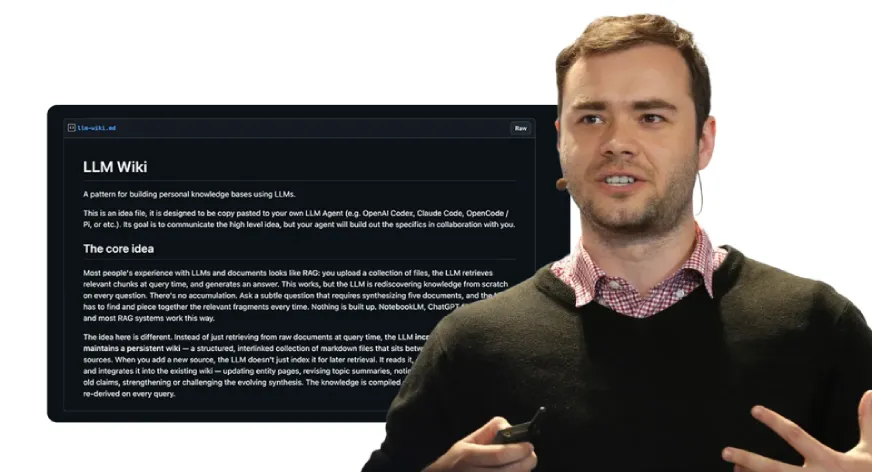
Most AI workflows follow the same loop: you upload files, ask a question, get an answer, and then everything is reset. Nothing sticks. For large codebases or research collections, this doesn’t work quickly. Even if you revisit the same material, the model relearns from scratch instead of building on previous context or information.
Andrej Karpathy highlighted this gap and proposed the LLM Wiki, a continuous knowledge layer that changes with use. The idea quickly became known as Graphify. In this article, we explore how this approach is reinventing the AI workflow for remote content and what it opens up next.
What is Graphify?
The Graphify system works as an AI coding assistant that allows users to turn any index into a searchable information graph. The system works as an independent entity and not just as a chatbot system. The program works within AI coding environments including Claude Code, Cursor, Codex, Gemini CLI and additional platforms.
The installation process requires one command that needs to be executed:
pip install graphify && graphify installYou should start your AI assistant and enter the following command:
/graphifyYou need to direct the program to any folder that can be a codebase or a research directory, or a dump of notes and leave a place. The program generates a graph of information that users can explore after pointing to any folder.
What Is Built (And Why It Matters)
When you finish running Graphify, you will find four outputs in your graphify-out/ folder:
- I graph.html file is an interactive, clickable representation of your information graph that allows you to filter searches and find communities
- I GRAPH_REPORT.md file is a simple language summary of your god nodes, any unexpected links you may find, and other suggested questions that arise as a result of your analysis.
- The graph.json file is a persistent representation of your graph that you can query after a few weeks without reading the original data sources to generate your results.
- The cache/directory contains a SHA256-based cache file to ensure that files that have changed since the last time you ran Graphify are processed again.
All of this becomes part of your memory frame. You will no longer read raw data; instead, you will read structured data.
The token efficiency benchmark tells the real story: on a mixed corpus of Karpathy repos, research papers, and images, Graphify returns 71.5x fewer tokens per query compared to reading the raw files directly.
How Does It Work Under the Hood?
Working with Graphify requires two separate implementation phases. The process needs to be understood because the way it works depends on this information:
The Graphify program extracts code structure with a tree-sitter that analyzes code files to identify their components. It includes classes, functions, imports, call graphs, docstrings and logical comments. The program operates independently of the LLM component. Your device stores all file contents without data transfer. The system works with three advantages because it achieves high speed while delivering accurate results and protecting the user’s privacy.
Claude subagents perform their tasks simultaneously on all documents including PDFs and markup content and images. They extract concepts, relationships, and the basis of design from unstructured content. The process leads to the creation of an integrated NetworkX graph.
The integration process uses the public discovery of Leiden which acts as graph-topology-based a method that does not require embedding or a vector database. The Claude Pass 2 domain generates the same semantic edges that already exist as embedded objects within the graph that directly affect the clustering process. The structure of the graph acts as a signal that indicates the similarity between objects.
One of the most beneficial features of Graphify is its way of assigning confidence levels. Relationships will be marked:
- DISMISSED – found in a source with one confidence level.
- INNFERRED – a reasonable assumption based on a confidence level (number).
- THEY ARE POWERFUL – requires human review.
This allows you to distinguish between derived and directed data that provides a level of transparency not available in most AI tools and will help you develop better designs based on graph extraction.
What Can You Really Ask?
The process of querying the system becomes intuitive after the completion of the graph construction. Users can issue commands through their terminal or through their AI assistant:
graphify query "what connects attention to the optimizer?
graphify query "show the auth flow" --dfs
graphify path "DigestAuth" "Response"
graphify explain "SwinTransformer"
The program requires users to perform searches using specific words. Graphify traces the actual connections on a graph at each connection point while displaying connection types and confidence levels and source points. I --budget flag allows you to limit the output to a specific token value, which is important if you need to pass subgraph data to your next notification.
The correct workflow proceeds according to these steps:
- Start with a document GRAPH_REPORT.md which provides important information about the main topics
- Use graphify query to draw a focused subgraph for your specific query
- You should send the combined output to your AI assistant instead of using the complete file
The system requires you to navigate through the graph instead of presenting its entire content in a single prompt.
Always On Mode: Making Your AI Smarter Automatically
System-level tuning of your AI assistant can be done using graphify. After creating the graph, you can run this in the terminal:
graphify claude install This creates a CLAUDE.md file in the Claude Code directory that tells Claude to use the GRAPH_REPORT.md file before answering about properties. Also, it puts a PreToolUse hook into yours settings.json file that is burned before every Glob and Grep call. If there is a data graph, Claude should see navigation information through the structure of the graph instead of searching for individual files.
The effect of this change is that your assistant will stop scanning files randomly and will use data structures to navigate. As a result, you should get quick answers to everyday questions and advanced answers to more involved questions.
File Type Support
Because of its multi-modal capabilities, Graphify is an essential tool for research and data collection. Graphify supports:
- Tree analysis for 20 programming languages: Python, JavaScript, TypeScript, Go, Rust, Java, C, C++, Ruby, C#, Kotlin, Scala, PHP, Swift, Lua, Zig, PowerShell, Elixir, Objective C, and Julia
- Mine quotes and concepts from PDF documents
- Process images (PNG, JPG, WebP, GIF) using Claude Vision. Diagrams, screenshots, whiteboards, and materials not supported in English.
- Export full relations and concepts to Markdown, .txt, .rst
- Process Microsoft Office documents (.docx and .xlsx) by setting optional dependencies:
pip install graphifyy[office] Simply drop a folder containing mixed file types into Graphify, and it will process each file according to the appropriate processing method.
Additional Skills You Should Know
Graphify includes several features for use in a production environment, in addition to its main function of generating graphs from code files.
- Automatically sync with watch: Running Graphify in a terminal can automatically rebuild the graph as the code files are edited. When you edit a code file, the Abstract Syntax Tree (AST) is automatically rebuilt to reflect your change. When you edit a document or image, you are prompted to run -update so that LLM can re-pass the graph to reflect all changes.
- Git hooks: You can create a Git commit to rebuild the graph whenever you change branches or commit by installing the graphify hook. You don’t need to run a background process to use Graphify.
- Submit a Wiki with -wiki: You can export Wiki-style markup via the index.md entry for all god and community nodes within a Graphify database. Any agent can scan the database by reading the uploaded files.
- MCP Server: You can start the MCP server on your local machine and have your helper refer to the structured graph data for repeated queries (
query_graph,get_node,get_neighbors,shortest_path) by runningpython -m graphify.serve graphify-out/graph.json. - Export options: You can export from Graphify to SVG, GraphML (for Gephi or yEd), and Cypher (for Neo4j).
The conclusion
Your AI assistant’s memory layer means it can hold on to ideas for future periods. Currently, all AI coding is stateless, so every time you use your assistant it starts from scratch. Every time you ask the same question, you will read all the same files as before. This means that every time you ask a question you use tokens to send your previous context to the system.
Graphify gives you a way out of this cycle. Rather than constantly rebuilding your graph, you can simply use a SHA256 cache to reproduce changes from your last session. Your queries will now use an integrated representation of the structure instead of reading from a non-integrated source.
With GRAPH_REPORT.mdyour assistant will have a map of every graph and /graphify commands will allow your assistant to navigate that graph. Using your assistant in this way will completely change the way you do your work.
Frequently Asked Questions
A. Prevents duplicate files by creating a continuous, organized information graph.
A. It combines AST extraction with corresponding AI-based logic extraction to create a composite graph.
A. It uses structured graph data, reducing the use of tokens versus repeatedly processing raw files.
Sign in to continue reading and enjoy content curated by experts.