This scene plays out in every developer group everywhere.
Someone wraps a few LangChain calls inside a loop, adds a few tools, and proudly says, “We built an AI agent.“The demo looks great. Everyone is impressed.
Then go to production.
An unexpected first input arrives. Workflow breaks. Logs are full. Notifications start firing. Suddenly, you fix system errors in the middle of the night.
The problem is not the code. That automation and agent AI are very different.
Treating automation as an AI agent, or expecting the agent to behave like a deterministic workflow, leads to unexpected failure. Your “agent” may send the same email to a customer 47 times, skip critical steps, or make decisions you never intended.
Understanding where automation ends and agent AI begins isn’t just a technical difference. It’s the difference between building reliable systems and creating expensive, difficult-to-fix problems.
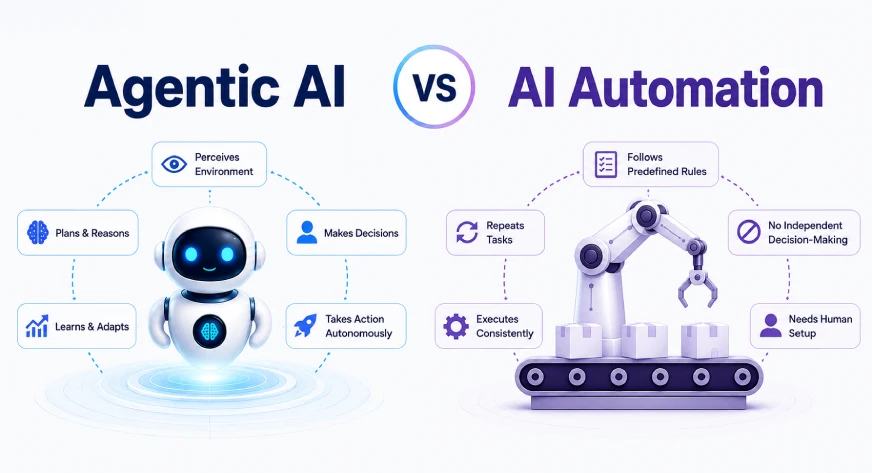
Agentic AI vs Automation
| Default | AI Agent |
|---|---|
| Execute predefined workflows | Reach the goal, no matter what the direct path is |
| He follows fixed rules and logic | Makes decisions based on context and observations |
| A predetermined sequence of steps | The dynamic sequence is determined during execution |
| It cannot adapt itself beyond the established rules | Changes strategy when conditions change or failure occurs |
| The engineer controls every step | The engineer defines the purpose; the agent decides the steps |
| It works best with planned, anticipated installations | It can handle imprecise and unstructured input |
| It is stateless unless explicitly configured | It keeps memory of previous actions and results |
| There is no editing power | It organizes, re-prioritizes, and chooses the next action |
| Stops or throws an error if the assumption is violated | It tries other methods before failing |
| Tools are called in a fixed order | It chooses which tool to use based on the current situation |
| Very predictable and limited | It is less predictable but more flexible |
| It’s easy to track all the steps | It requires logging of reasoning and decision history |
| Best suited for ETL pipelines, invoice processing, compliance testing, and structured reports | Best suited for research agents, coding assistants, customer support, and multi-step troubleshooting |
| Example: A daily sales report generated using fixed business rules | Example: A research agent who decides whether to search, gather more information, or summarize |
| Cannot work without predefined rules (eg, a changed CSV schema breaks the workflow) | It can make unpredictable decisions if guardrails and boundaries are not defined |
What is AI Automation?
Think of automation as a sales machine. You choose B4, and the machine responds the same way every time.
Automation gives you direct control: you define how things should be done and in what order. Whether it’s a cron job from 2008 or a modern data pipeline, automation does exactly what you tell it to do.
And frankly, the automation is at a low level. It’s fast, readable, and predictable. Invoice processing, ETL pipelines, compliance checks, nightly reports: these are automated problems, perfectly solved by automation. Adding “agent” to the definition doesn’t make them any better.
Hands-on: A Simple Automation Pipeline
def run_daily_report(input_path: str, output_path: str):
    df = pd.read_csv(input_path)
    df["processed_at"] = datetime.now().isoformat()
    df["high_value"] = df["revenue"] > 10000  # fixed rule, always
    df.to_csv(output_path, index=False)
    print(f"Done. {len(df)} rows processed.")

run_daily_report("sales.csv", "daily_report.csv")
Output:
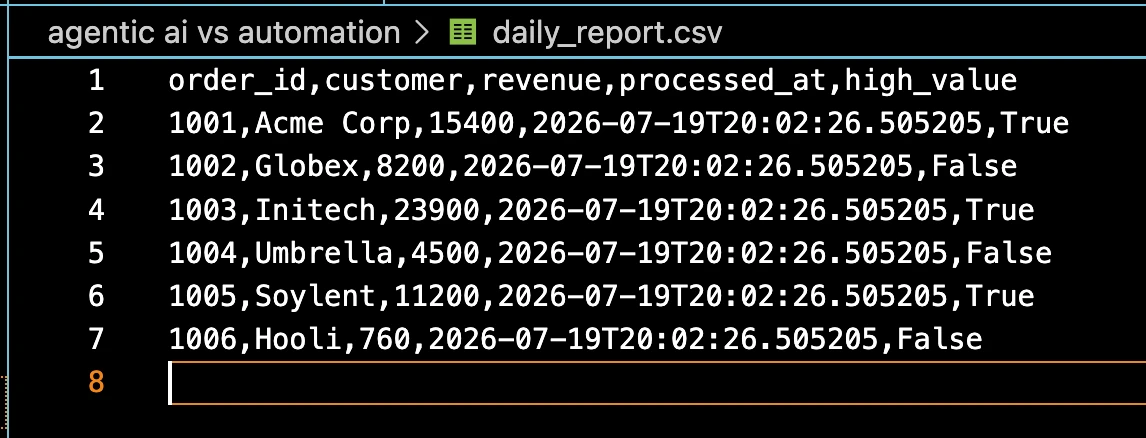
Now rename the “income” column to “value” in the CSV source. The pipe breaks. That is the limit of automation: it works well within its framework, and fails when it goes outside of it.

What is Agent AI?
The agent behaves as a contractor. He says “I built a deck on Friday,” that’s all. They deal with permits, building materials, weather delays, and construction sequences, none of which are specific. They see the situation, make a plan, act, observe the results, and adjust.
The main characteristics of a real agent are:
- An objective instead of a list, knows what constitutes the end of the process, not just the next steps;
- Intelligent planning, can decide on the right tools based on previous experience;
- Memory, can track what has been done before, and how;
- Adaptation, when it fails, is able to change tactics instead of breaking up.
Hands on: Build a Small Agent Loop
This is a research agent that always has the same goal, but chooses a route by itself, depending on its previous knowledge.
class ResearchAgent:
    def __init__(self, tools: dict):
        self.tools = tools
        self.memory = {"findings": [], "goal": None}

    def decide_next_action(self) -> str:
        if not self.memory["findings"]:
            return "search_web"          # nothing yet, start searching
        if len(self.memory["findings"]) < 3:
            return "fetch_detail"        # need more depth
        return "write_summary"           # enough to summarize

    def run(self, goal: str) -> str:
        self.memory["goal"] = goal
        for _ in range(10):              # always cap your loops
            action = self.decide_next_action()
            result = self.tools[action](self.memory)
            self.memory["findings"].append(result)
            if action == "write_summary":
                break
        return self.memory["findings"][-1]
Output:
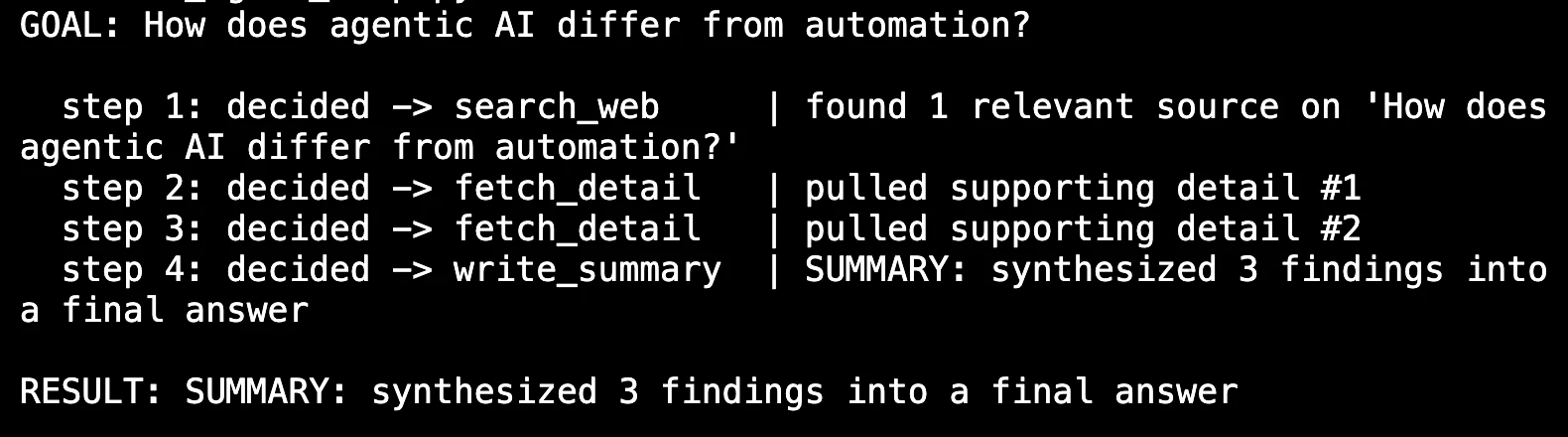
The decide_next_action() method is all that is needed. The agent gets what it knows to work. If you ever want to improve your code, introduce a new condition where the agent uses search_alternative if search_web returns empty results. This is called adaptation, and machines cannot do it.
Basic process: find → think → do → change → back to the beginning.
Where Most Systems Fail
Inconvenient truth: many so-called “agent” systems today are automated with LLM tied to a single step. LLM fills out the form or separates some input, and the next step works regardless of what we decided. That is not an agency. It’s a fancier vending machine.
A more reliable category:
| Level | Behavior | A Real Example |
| Default default | Fixed steps, no LLM | Cron job, ETL pipeline |
| LLM-assisted automation | Fixed measures, LLM in one place | RAG with hard-coded retrieval |
| A bit of an agency | LLM chooses the tools, the goal is fixed | React agent with tools registration |
| Full time agency | LLM sets small goals, builds tools | Self directed research or coding agents |
Most commercial postings stay at level 2 or 3, and that’s fine. Level 3 is using technology effectively. The problem starts when the group wants level 4 while sending level 2, and then they can’t figure out why they split apart from the happy path.
Side-by-Side: Customer Support Ticket Holder
Same problem, two programs: split the ticket, write the answer.
Automation version
def handle_ticket(ticket_text: str) -> dict:
    category = classify(ticket_text)       # always runs
    template = get_template(category)      # always runs
    response = fill_template(template, ticket_text)  # always runs
    return {"category": category, "response": response}
Output:
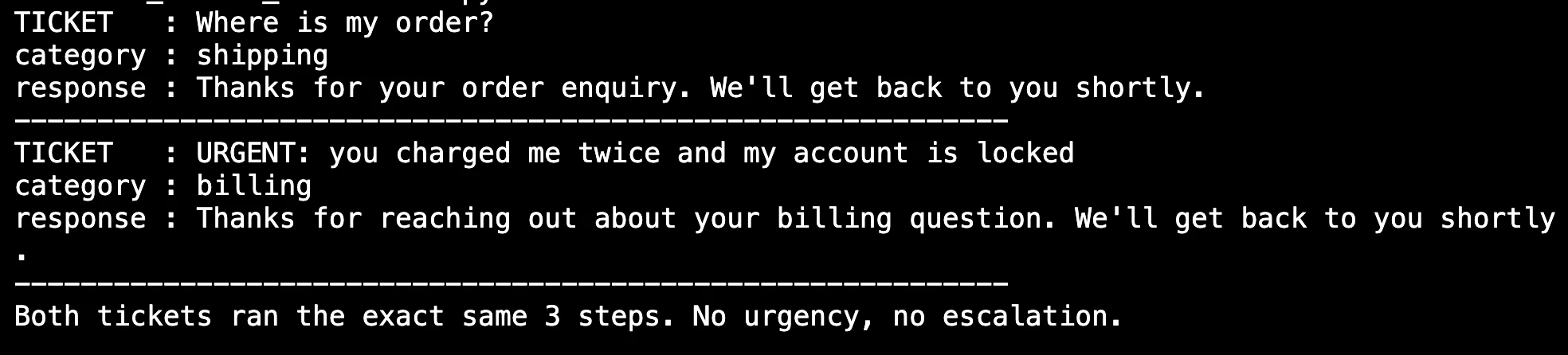
Fast, predictable, cheap to run. But it can’t check order history, flag a VIP customer, or ask a clarifying question. All tickets get the same treatment: “IT’S OUT, you charged me twice and my account is locked” is treated like “Where’s my order?
Agentic version
def handle_ticket_agentic(ticket_text: str, tools: dict) -> dict:
    state = {"ticket": ticket_text, "history": [], "resolved": False}
    for _ in range(8):                     # bounded loop
        next_action = llm_decides(state)   # LLM picks the next tool
        result = tools[next_action](state)
        state["history"].append({"action": next_action, "result": result})
        if next_action == "resolve":
            state["resolved"] = True
            break
    return state
Output:
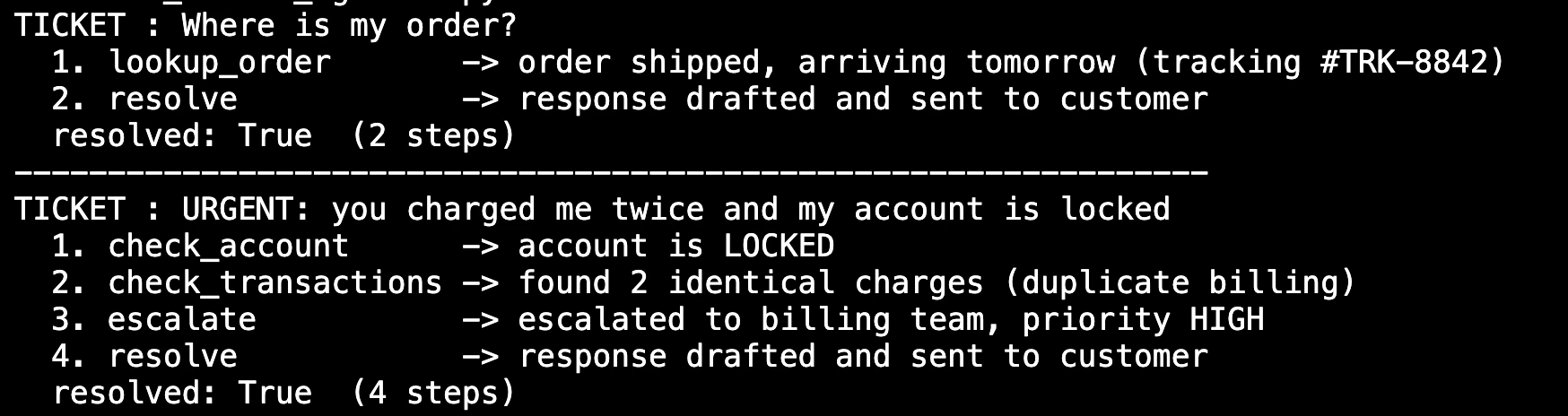
Here, the method is determined at runtime. With an urgent payment message, an agent may check account status and transaction history, flag a payment problem, and escalate before responding. As for “Where is my order?”, it solves in a few steps using the shipping API. Same system, different route, based on ticket requirements.
How to choose between them?
This is not about any new technology. It’s about the nature of the problem.
Use the default when:
- The work follows the same, readable process every time
- Speed is more important than flexibility
- Compliance requires that all steps be traceable
- You use the same function at high volume
Use Agent AI if:
- The proper sequence of steps depends on what was discovered along the way
- Unstructured input (emails, documents, chats)
- Failure requires a new approach, not just trying again
- The problem is really open
The conclusion
Automation is designed to be predictable. Agent AI is designed to be flexible. And there is nothing better; they solve different problems.
“Agent” sounds a lot more impressive than “pipeline,” so teams get to what they’ve built closer to the latest. When that pipe breaks on the other side and someone asks why an agent failed, the honest answer is usually that it was never really an agent.
A better starting point is automation. Map where it works and where it hits the wall. Access agent behavior only where automation cannot go.
Frequently Asked Questions
A. Automation follows a predefined workflow, while agent AI adapts its actions to achieve a goal based on changing context.
A. Use agent AI when tasks require planning, adaptation, tool selection, or handling imprecise and unstructured input.
A. Most are automated workflows with added LLM, no real planning, memory, and dynamic decision making.

Data Science Trainee at Analytics Vidhya
I currently work as a Data Science Trainer at Analytics Vidhya, where I focus on building data-driven solutions and applying AI/ML techniques to solve real-world business problems. My work allows me to explore advanced analytics, machine learning, and AI applications that empower organizations to make smarter, evidence-based decisions.
With a strong foundation in computer science, software development, and data analysis, I am passionate about using AI to create impactful, innovative solutions that bridge the gap between technology and business.
📩 You can also contact me at [email protected]
Sign in to continue reading and enjoy content curated by experts.